
Introduction
The gosund smart plug has quickly become one of the most popular smart home accessories for homeowners looking to automate their daily routines without spending a fortune. Whether you want to control lights remotely, manage appliances through voice commands, or monitor energy usage, this compact device makes it all possible with minimal effort.
Smart plugs are among the easiest ways to enter the smart home world. You don’t need to rewire your house or invest in expensive hubs. With a simple plug-and-play setup, the gosund smart plug turns ordinary devices into smart devices within minutes. In this detailed guide, we’ll explore everything you need to know — from features and setup to compatibility, pros and cons, and frequently asked questions.
What Is a Gosund Smart Plug?
A gosund smart plug is a Wi-Fi enabled device that connects between your wall outlet and any electrical appliance. Once connected, it allows you to control that appliance using a smartphone app or voice assistant like Amazon Alexa or Google Assistant.
In simple terms, it acts as a remote switch for your devices. You can:
- Turn devices on/off from anywhere
- Set schedules
- Create timers
- Monitor energy usage (in supported models)
- Automate routines
This makes it perfect for lamps, coffee makers, fans, heaters, TVs, and more.
Key Features of Gosund Smart Plug
1. Remote Control via Smartphone
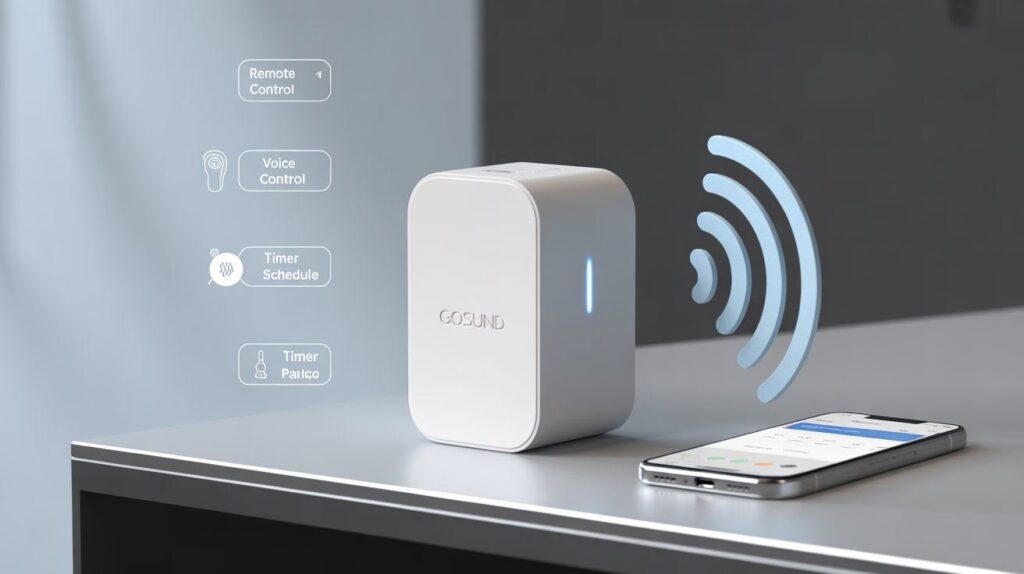
The gosund smart plug connects to your home Wi-Fi network. Using the Gosund or Smart Life app, you can control your connected devices from anywhere in the world.
Forgot to turn off your iron? No problem. Open the app and switch it off instantly.
2. Voice Assistant Compatibility
Most gosund smart plug models are compatible with:
- Amazon Alexa
- Google Assistant
You can say:
- Alexa, turn off the living room lamp.
- Hey Google, turn on the coffee maker.
This hands-free convenience makes daily life easier.
3. Scheduling & Automation
You can create custom schedules for devices. For example:
- Turn lights on at sunset
- Switch off heaters at midnight
- Start your coffee maker at 6 AM
Automation helps improve comfort while reducing energy waste.
4. Energy Monitoring (Selected Models)
Some gosund smart plug versions include energy tracking features. These allow you to:
- Monitor real-time power consumption
- Track monthly energy usage
- Identify high-consumption appliances
This is especially useful if you want to lower electricity bills.
5. Compact & Space-Saving Design
Unlike bulky smart plugs, many gosund models are compact enough to allow two plugs in the same outlet without blocking each other.
6. No Hub Required
One of the biggest advantages is that the gosund smart plug works directly with Wi-Fi. You don’t need an expensive smart home hub.
How to Set Up Gosund Smart Plug
Setting up the device is simple and beginner-friendly.
Step 1: Plug It In
Insert the gosund smart plug into a wall outlet.
Step 2: Download the App
Install the Gosund app or Smart Life app from:
- Google Play Store
- Apple App Store
Step 3: Connect to Wi-Fi
Make sure you are using a 2.4GHz Wi-Fi network (most models do not support 5GHz).
Step 4: Add Device in App
Follow in-app instructions to connect the plug.
Step 5: Link to Alexa or Google (Optional)
Enable the Gosund skill in Alexa or Google Home app and link your account.
Setup usually takes less than 5 minutes.
Why Choose Gosund Smart Plug?
Affordable Pricing
Compared to other brands, gosund smart plug offers excellent value for money.
Reliable Performance
Users report stable Wi-Fi connection and consistent performance.
Easy Integration
Works seamlessly with existing smart home systems.
Safe and Certified
Most models come with:
- ETL certification
- Overload protection
- Fire-resistant material
Pros and Cons
Pros:
- Budget-friendly
- Easy setup
- Voice control support
- Energy monitoring (selected models)
- No hub required
- Reliable scheduling feature
Cons:
- Only supports 2.4GHz Wi-Fi
- App interface could be improved
- Limited advanced automation compared to premium brands
Best Uses for Gosund Smart Plug
1. Lighting Control
Turn lamps on/off remotely or schedule them while you’re away.
2. Kitchen Appliances
Automate coffee makers, kettles, or microwaves (check wattage limits).
3. Home Office
Control printers, routers, and monitors easily.
4. Security Enhancement
Create random light schedules when traveling to simulate presence.
5. Energy Saving
Monitor and reduce standby power consumption.
Gosund Smart Plug vs Other Smart Plugs
| Feature | Gosund | TP-Link | Amazon Smart Plug |
| Price | Budget-friendly | Mid-range | Higher |
| Energy Monitoring | Yes (some models) | Yes | No |
| Hub Required | No | No | No |
| Voice Support | Alexa & Google | Alexa & Google | Alexa only |
The gosund smart plug is ideal for users who want smart features without premium pricing.
Safety Considerations
Before using:
- Check maximum wattage rating (usually 10A or 15A)
- Avoid high-power appliances like air conditioners
- Ensure proper Wi-Fi security
- Keep away from water
Following safety guidelines ensures long-term performance.
Energy Efficiency and Cost Savings
Smart plugs help reduce phantom energy consumption — power used by devices even when turned off.
Using a gosund smart plug can:
- Cut unnecessary standby power
- Reduce monthly electricity bills
- Improve energy awareness
Over time, the savings can offset the device cost.
Who Should Buy a Gosund Smart Plug?
This device is perfect for:
- First-time smart home users
- Budget-conscious buyers
- Renters (no installation required)
- Small apartment owners
- Students
- Home automation beginners
If you want simple automation without complexity, this is a strong choice.
Final Thoughts
The gosund smart plug stands out as one of the simplest and most affordable ways to bring smart home functionality into everyday life. It delivers exactly what most users need: remote control, voice assistant compatibility, scheduling, and in some models, energy monitoring — all without requiring a hub or complicated installation. For beginners and budget-conscious homeowners, it offers a smooth entry into home automation without overwhelming features or high costs.
While it may not offer the advanced automation depth of premium smart home brands, the gosund smart plug excels in reliability, ease of use, and practical functionality. It’s ideal for managing lights, small appliances, and energy usage in a straightforward way. If your goal is convenience, better control over electricity consumption, and simple smart integration, this device provides excellent value and dependable performance.
FAQs about gosund smart plug
1. What is a gosund smart plug used for?
A gosund smart plug is used to turn regular electrical devices into smart devices. It allows you to control appliances remotely, set schedules, create timers, and in some models, monitor energy usage through a smartphone app or voice assistant.
2. Does the gosund smart plug require a hub?
No, the gosund smart plug does not require a separate hub. It connects directly to your home’s 2.4GHz Wi-Fi network, making installation simple and cost-effective.
3. Is the gosund smart plug compatible with Alexa and Google Assistant?
Yes, most gosund smart plug models work with Amazon Alexa and Google Assistant. This allows you to control connected devices using voice commands for hands-free convenience.
4. Does it support 5GHz Wi-Fi networks?
No, most gosund smart plug models only support 2.4GHz Wi-Fi networks. You may need to adjust your router settings if your network is set to 5GHz only.
5. Can I monitor energy usage with the gosund smart plug?
Some models include energy monitoring features. These allow you to track real-time power consumption, review historical data, and identify high-energy appliances to reduce electricity costs.
6. Is the gosund smart plug safe to use?
Yes, it is generally safe when used within its rated capacity. Most models include ETL certification, overload protection, and fire-resistant materials. Always check the maximum wattage before connecting appliances.
7. What appliances can I use with a gosund smart plug?
You can use it with lamps, coffee makers, fans, heaters (within wattage limits), TVs, routers, and other small appliances. Avoid high-power devices like air conditioners unless the plug’s rating supports it.
8. Can I control multiple gosund smart plugs at once?
Yes, you can group multiple plugs in the app to control them simultaneously. This is useful for managing several lights or appliances in the same room.
9. What happens if my Wi-Fi disconnects?
If your Wi-Fi connection drops, remote control features will not work until the connection is restored. However, scheduled routines may continue depending on the model and app configuration.
10. Can I share access with family members?
Yes, the gosund or Smart Life app allows you to share device control with other household members, so everyone can manage connected appliances.
11. Is installation difficult?
No, installation is very simple. You can simply connect it to a power socket, install the app, link it to your Wi-Fi network, and complete the setup by following the steps provided within the app. The setup process usually takes less than five minutes.
12. Can a gosund smart plug help reduce electricity bills?
Yes, by scheduling devices, reducing standby power consumption, and monitoring energy usage (on supported models), the gosund smart plug can help lower unnecessary electricity usage over time.
ALSO READ
This Is What Ultra-Premium Smartphone Features Really Offer
AI Chatbot Conversations Archive For Better Engagement
How to Check Your Email Address on Any Device